ATLAS
Your life, organised

Atlas

Your plans, routines, habits, training, skincare, supplements, cycle and fasting in one calm place. Plan once, tick off each day, and see how the week is going.

Free on the web. Works offline. Nothing to sign up for.

What it does

Everything that holds a good day together

Planner views

A master planner for today, plus daily, weekly and monthly views. Drag anything to another day or time, or keep it in the Anytime bank until it has a day.

Routines

Skincare, morning and evening, step by step with a night timetable. A gym week with exercises and notes. Supplements by time of day, with stock that counts down.

Add a product by photo

Photograph a supplement bottle. Atlas reads the label, lists everything it contains, slots it into the right time of day and pauses the supplements it already covers.

Search the whole plan

Type retinol or glutes and Atlas lists every night, step and training day it appears on, with the dates. Tap a date to open that day, or press / on a laptop to start.

Add it the way you would say it

Type "gut health shot every morning at 8, remind me" and Atlas turns it into the right task, repeat and time. Type "add dermaplaning" and it finds the night that suits your skincare plan, and says why.

Habits with streaks

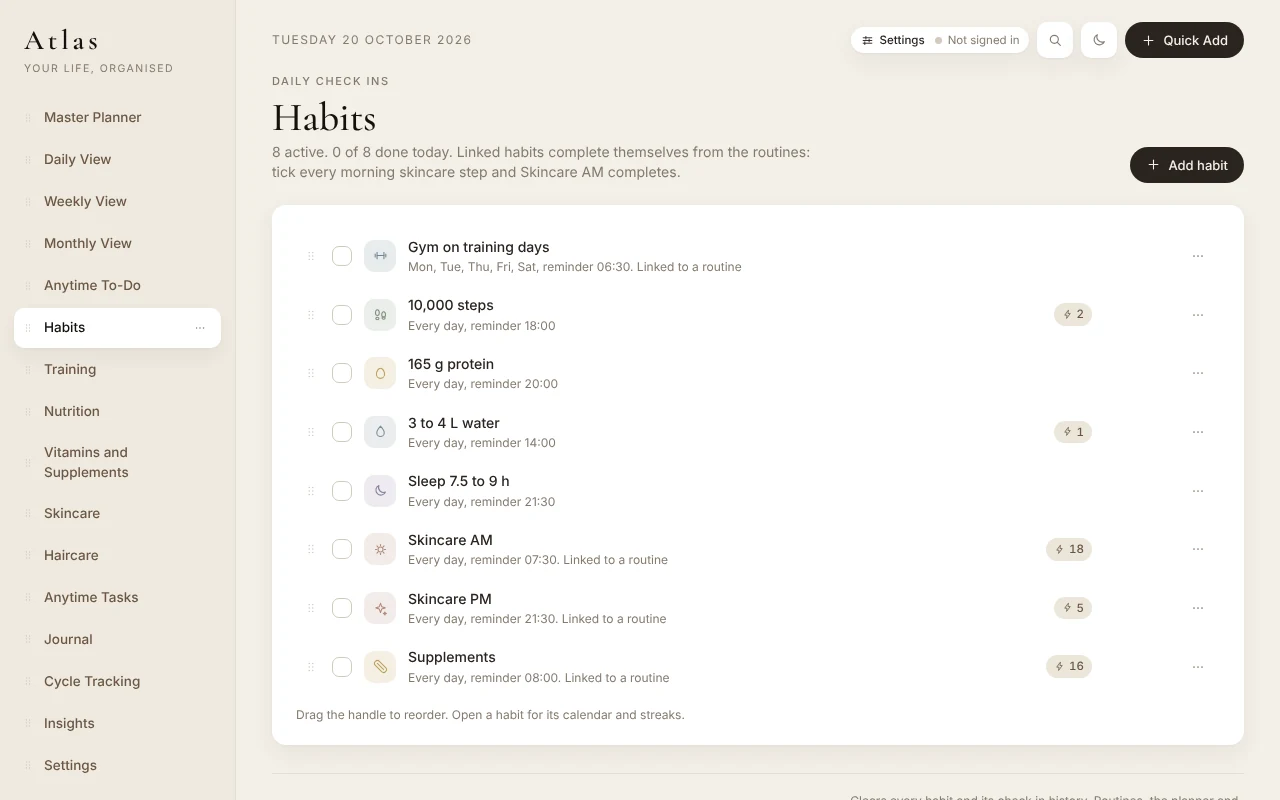
One tap to check in. Streaks grow as you go, and a missed day is just a missed day. Linked habits tick themselves when the routine is done.

Insights and plan review

An Atlas Score for the day, completion trends, weight progress and supplement pairings. The plan review suggests hints you can add in one tap and undo just as easily.

Period tracking that learns you

Log your period in a tap, with flow, symptoms and mood. A calendar shows when it should end and when the next one is likely, worked out from your own cycles.

Share or print your routine

An Atlas PDF of your skincare, supplements or whole plan, made on your device. Send it to a friend who asks, or print it for the bathroom wall.

Your devices, one plan

Sync is optional. Sign in and your phone and laptop share the same plan; signed out, everything stays on the device. Either way it works offline and installs to your home screen.

The full list

Everything in Atlas

Every planner can be hidden or brought back, so Atlas can be as full or as simple as you like.
Plan

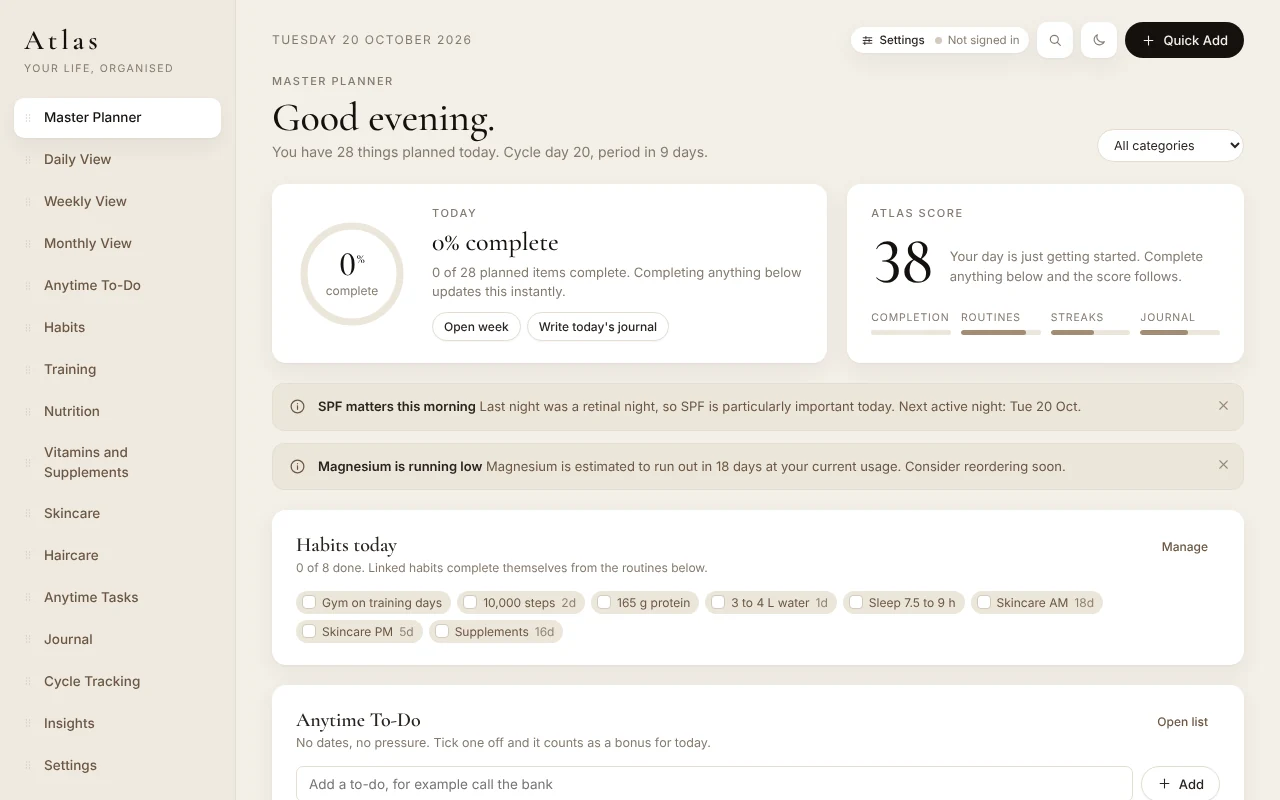
  • Master PlannerToday at a glance: progress ring, score, habits due, your cycle day, and the morning, afternoon, evening and anytime lists.
  • Daily, weekly and monthly viewsA time grid for one day, seven days side by side, the month with key events.
  • Drag and dropMove anything to another day or time; drag a bank task onto the plan.
  • RepeatsDaily, on chosen weekdays, every week or every few weeks, or monthly.
  • Anytime To-DoA quick list for anything without a day: call the bank, order a prescription. Tick one off and it counts as a bonus for that day.
  • Anytime task bankTasks with no fixed day, waiting until they have one.
  • Custom listsYour own lists alongside the planners.
  • Quick AddA plain form, Smart add for a sentence, or a photo.

Routines

  • SkincareMorning and evening steps, a night timetable with retinal, glycolic and recovery nights, treatments that keep the nights around them clear, and a recovery night swap when skin needs it.
  • TrainingA seven day split with exercises, cardio and notes; training days count as the Gym habit.
  • SupplementsSlots through the day, with food or without, stock that counts down and a running low notice; anything on prescription is kept free of timing advice.
  • NutritionCalories for rest and run days, macros, water and the lifestyle targets.
  • HaircareWash days, treatments, products and goals.
  • Planner libraryHide what you do not use and bring it back whenever you like.

Track

  • HabitsStreaks, a calendar for every habit, and linked habits that complete from the routines.
  • JournalMood, energy, sleep, symptom tags and a daily dump.
  • Cycle trackingA period tracker: log a period in a tap, flow, symptoms and mood, a calendar with the expected end and the next period, learnt from your own cycles. Kept on your device unless you choose to sync it.
  • Fasting timerDrag your fasting window round a 24 hour clock, start it in a tap and see the time left on Today, with a simple log of your fasts and, in the iPhone app, a reminder to start and one when you reach your goal. Kept on your device.
  • InsightsThis week at a glance, the last four weeks side by side, your best current streaks and the habit that slips most.
  • WeightEntries over time with the trend on the Insights page.
  • Atlas ScoreOne number for the day, built from completion, routines, streaks and the journal.
  • NoticesSPF the morning after an active night, a supplement running low, a clash in the skincare week; dismiss any with an X once read.

Helpers

  • Add a product by photoThe label read on the device, or through your account by a reader that picks up every ingredient; you check it before anything is saved.
  • Smart addPlain words become the right task, category, repeat and time.
  • Treatments placed for youType dermaplaning, a clay mask or a vitamin C serum and Atlas picks the night or morning that suits your skincare plan, says why with its sources, and keeps the nights around it clear.
  • Plan reviewPractical hints from your plan and your check ins, added in one tap and undone as easily.
  • Supplement notesWhat is often paired, what is worth checking, timing notes and anything running low, drawn from what is on your list.
  • SearchFind any task, routine or night in the plan; press / on a laptop.

Yours

  • Free on the webNo ads, no subscriptions, nothing to unlock.
  • Works offlineAfter the first visit, Atlas opens and works without a connection; installs to the home screen on phone, tablet, Mac and PC.
  • Optional syncSign in and your devices share one plan, protected row by row; your cycle log only if you choose; delete your cloud data at any time.
  • Light and darkTwo themes, each designed in its own right.
  • Share or printAn Atlas PDF of the parts you pick, made on your device, to send to a friend or pin up; never your journal or cycle log.
  • Your data, your fileExport everything as a file and import it again; clear a page with ten seconds to undo, or start again.
A look inside

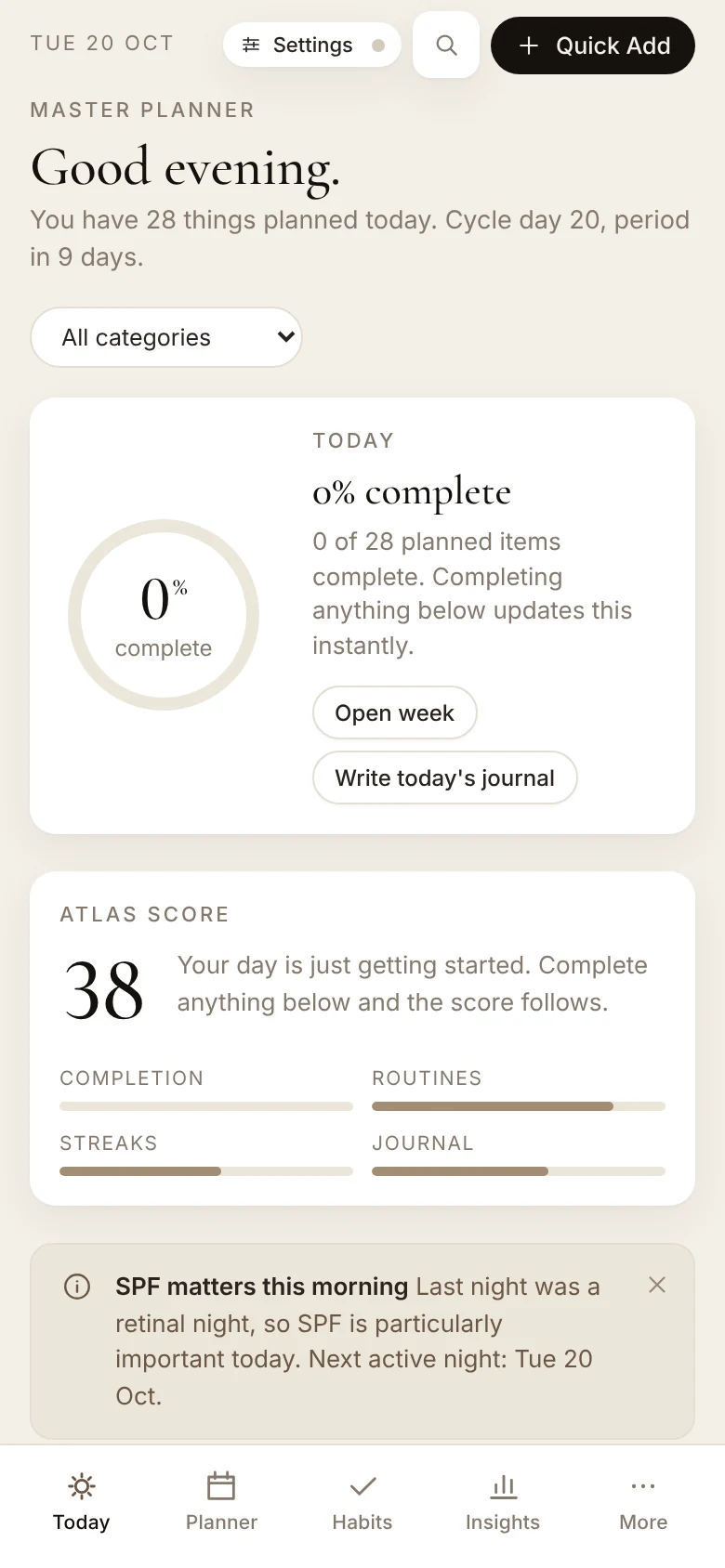
The same Atlas on a laptop, a tablet and a phone

The Atlas master planner on a laptop: today's progress ring, the Atlas score, habits for today and the morning list
Master Planner: today at a glance, with the routines and habits that are due.
The Habits page: eight habits with check boxes, streak counts and reminder times
Habits: a tap to check in, streaks beside each one, and the linked routines tick themselves.
Atlas on a phone: the Today tab with the progress ring, the Atlas score and the tab bar
On a phone, with tabs for Today, Planner, Habits and Insights.
The promise

Free on the web. No ads, no subscriptions, nothing to unlock. Your data stays on your device.

Everything stays on your device until you choose to sync. Export a copy as a file whenever you like.

Install

Add it to your home screen

Atlas is a web app. Installed, it opens full screen like any other app and keeps working without a connection.

iPhone and iPad

  1. Open Atlas in Safari.
  2. Tap the Share button.
  3. Choose Add to Home Screen, then Add.

Android

  1. Open Atlas in your browser.
  2. Open the browser menu.
  3. Choose Install app or Add to Home screen.

Mac and PC

  1. Open Atlas in Chrome or Edge.
  2. Click Install in the address bar.
  3. Atlas opens in its own window from then on.

Atlas keeps your plan, habits and check ins in this browser on this device. No analytics, no tracking, no account needed. Read the privacy policy.